
This post is part of a series of Masterclass tutorials about how to use Google+ as a blogger. For more installments, go the Masterclass main page, where you can also grab the badge to encourage people to follow you on G+.
What is a hangout?

Jen's picture is big while she talks. So is her hair
Google+ provides live video conferences. This is called a “hangout” and up to 10 people can participate. There are no charges like Skype and it’s great for catching up with friends and family, conducting a group online video conference or even watching YouTube together. You can have hangouts with your circles or specific people, or you can have public hangouts where anyone can join.
Hangouts on air
Google+ has now enabled Hangouts On Air – live hangouts broadcasting for all its users. Initially this functionality was only available to a limited number of professional broadcasters. You can broadcast live video publicly from a Google+ stream, a YouTube channel or embed it on a website. Here are 5 Google Hangouts features you’ll love. Hangouts On Air allows you to see how many viewers are watching and the show gets automatically recorded. Once you finished live streaming, the recording is uploaded to your YouTube channel, as well as on Google+ to act as an additional content repository.
Hangout Apps
There’s a suite of applications that you can use in hangouts like screen sharing, Google Docs integration, Notes and Sketchpad, Named Hangouts, and YouTube integration. Here’s a short video about how to use these features, also embedded here.
Chat
There’s also chat functionality on Google+ that can be really useful especially in hangouts if people want to talk to one another without disturbing the person speaking.
What you need for a great hangout
All you need is a computer with a webcamera and microphone. Here’s a excellent list from Kevin Kelly, former executive editor of Wired of things to do in order to have a great hangout.
Adding to Kevin’s list, we would also say that it’s best to request people who are not speaking on the hangout to mute their systems so as to reduce background noise and interference.
How to start a hangout
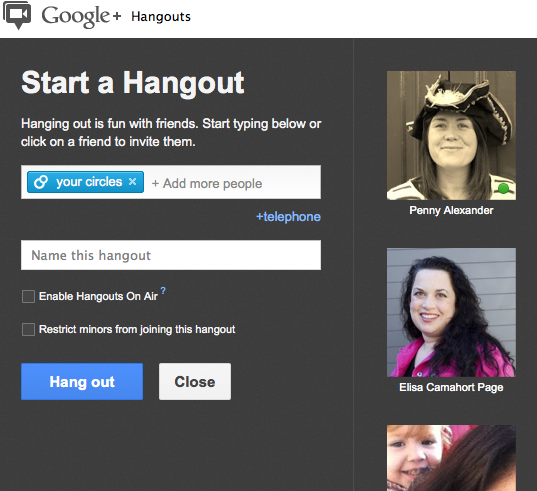
So go ahead and try one! To start a hangout, go to your Stream and click on “Start a hangout” in the right-hand sidebar. Then invite who’d you’d like to hangout with.


Invite people to your hangout and tick the box to make it "on air"
Finding other hangouts
You can also join public hangouts, this website has a list of live hangouts that are available for you to join in with.
 Troubleshooting on a hangout
For a step-by-step guide and tips about joining or setting up a Google+ Hangout then please see this document. If you are still having issues with the hangout functionality there is some further help on the Google+ Troubleshooting page
Masterclass 4 to-dos
- Host a hangout
- Join a BritMums hangout
- Watch a live hangout on air
See more Google+ Masterclass tutorials

About Jennifer Howze
Jennifer Howze is the Creative Director and co-founder of BritMums. She blogs about family travel at Jenography.net, tweets at @JHowze and Instagrams at @JHowze. Previously, she wrote the Alpha Mummy blog at The Times and as a journalist has contributed to The Times, The Guardian, The Independent, The Wall Street Journal, Travel & Leisure, Budget Travel, CNN.com, Allure, SELF and Premiere, among others. She won The Maggie Award from the Planned Parenthood Federation of America for a health article in Seventeen magazine.