

Yes, in just 5 minutes you can make a difference to your click-through rate (CTR) from search engines.
Table of contents
Why is click-through-rate (CTR) important?
Obviously whether you are shown on page 1 or page 10 of a web search makes a huge difference to people seeing your post. You want your content to match what they are searching for and then for them to click through and get what they want. Tasks you can do in 5 minutes can affect if someone clicks or doesn’t click.
It’s all about your SERP Appearance! (That’s Search Engine Results Page.)
And that is all about your metas!
In this lesson we’re talking about how to improve your CTR using the title shown in a search, the 150-character description, the image on mobile and any schema markup that the page may need. (Schema markup is semantic code in your site’s code that can improve how search engines read your content. For example, schema can be a specific template for recipe cards or a how-to.)
Meta Titles
Meta Titles are those shown to the search engines. You can have a snappy, cool title at the top of your post but for your meta title, you also want something that search engines understand.

About meta titles
Meta titles are short, concise and most likely different to the title that is displayed on your blog as they serve a slightly different purpose.
Think of it this way: Your blog post title is for the readers you already have, those that get your RSS feed, the loyal fans that check your site regularly and follow you to be able to find posts easily on your site.
They can be gimmicky, fun, written in your style.
A meta title is shown in a search. It’s limited by the number of characters you can use.
It’s your ‘advertising’ slogan to get people to click from their search to your site.
So you need to have your keyword in it but written naturally.
You can’t make false claims about what your content delivers. ‘101 ways to decorate your lounge’ and then only have 75. Be honest: Is it really the BEST EVER banana bread, or is it just Tasty and Easy to make?
You can adjust it regularly to see what works and what doesn’t.
Where to find your Meta titles
You can find the field for entering your Meta titles at the bottom of your post in WordPress. (See illustration above.)
Meta Descriptions
The meta description is the blurb about your post that could be the difference between a click or not as well.
Assume it’s an elevator pitch in 150 characters to sell your post against the 10 others that hold a position on the page in the search.
According to Google, the content of meta descriptions are not part of the algorithm it uses for SERPs (search engine results pages) so it doesn’t need to be keyword optimized, but if you can get your keywords in, all the better.
Like the title, the meta description needs to be honest, accurate and most of all enticing to get people to click through. It should also written naturally.
Some examples of good meta descriptions:

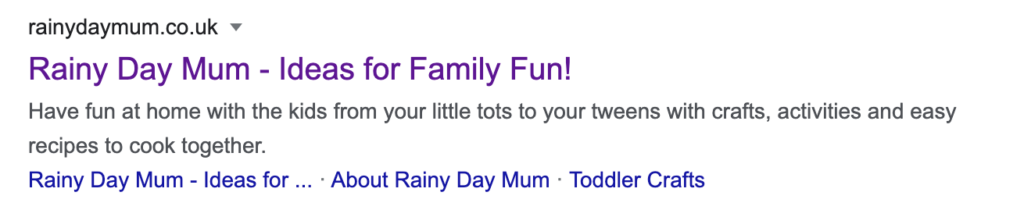

An interesting note about meta descriptions & Google
You can’t always rely on Google showing the meta description, in the event it decides that other parts of your post are more relevant for a particular search.
Knowing how to work around that is more than can be taught in this Mini Masterclass — it’s one of the areas covered in our Masterclass in more detail.
But in the meantime, you can write the best meta description possible. And like the meta title, it can be changed regularly to see what works the best.
Images & special formats
Mobile searches account for 52% of searches these days — that’s just going to go up. And to help get click-through on a mobile search, you need to show an image and make sure any text schema is formatted. (Don’t worry — that’s explained below.)
Images for mobile
The image that’s displayed in mobile searches is square and pulled from your post’s featured image (or the first image on your post if no featured image is set). It’s much better to choose your image and make it something illustrates your post. It should be high quality — not blurry or dark — and tantalising. If your post is about great holidays with teens, a picture featuring smiling teens on holiday is a good choice. If it’s about how to make a dinosaur birthday cake, the picture should show a well-lit, colourful dinosaur birthday cake. You get it.
Formatted text in your posts
If you post needs a schema – that is, a formatted recipe card, a formatted how to list etc – then make sure it has all the required elements. For example, with recipe posts, we recommend the plugin WP Recipe Card, which has fields for ingredients, method, and so on that help it display correctly.
Schemas and rich snippets are covered in more detail in the Masterclass, where you can learn everything from how to find the best plugins to reading the errors and warnings that you may have from using them.
Your 5-Minute Action Plan
So now you know the elements you’ll be concentrating on. What can you do in 5 minutes that’s focussed and concentrated on where it will help most?
First step: Head to Google incognito in a browser.
This is where you can check out your competition. (Go here for instructions on how to browse in Google incognito mode.)
If you are on page 6 on average, head to page 6 and see what would make you click on others.
- What stands out?
- How can you rise above the others?
- Which would you honestly click on first?
Remember the more that people click on your post, it faster it will move up the pages.
Second step: Head to your post.
You’re going to work just on your metas – THIS IS A JOB THAT YOU CAN DO IN 5 MINUTES and perfect to do whilst you make a cuppa or wait for your pasta to boil.
Rewrite that title and spruce up your meta description.
Third step: Now you have to tell Google to come and get it.
You’ve done this work, now you want Google to take notice.
So head to your Google Search Console — a free tool that helps you measure your site’s performance — and inspect your post and request indexing so you know that Google will see the changes you have made.
How to re-index a URL with Search Console
Here’s how it works, in layman’s terms. On search console at the top of the page, you input the link to your post and hit return.
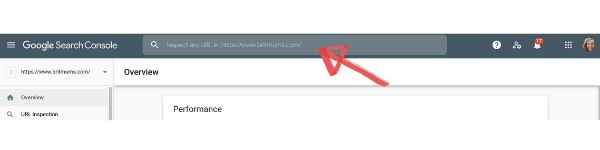
Search console will find your existing url — as in the image below. Hurrah! Now Request Indexing to get Google to actually go look at it again with its improved meta information.
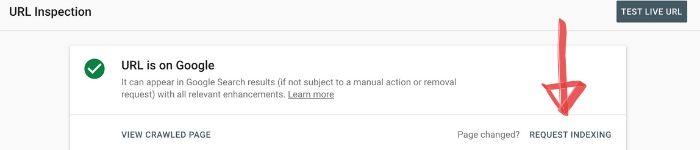
This could take a bit of time, so don’t worry when get this message:
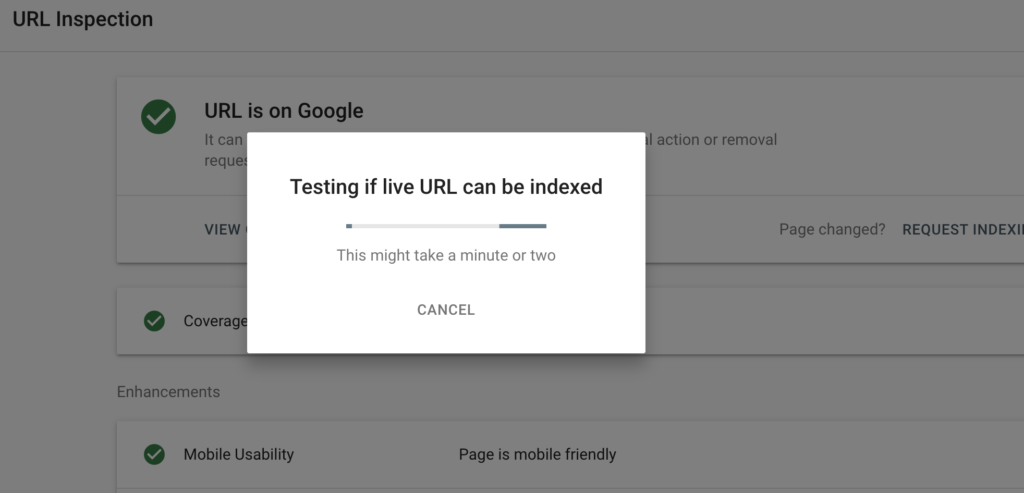
Then, you’ll get this message. Congratulations! You’ve just made your site more SEO friendly in minutes.

Before you finish
Just look at that post on mobile and see what the image looks like. If there’s a problem, you can make changing that a 5-minute task for another time.
